BioKey adds on-device TOTP
A hardware-sealed OTP extension for AmbiSecure BioKey that generates one-time passwords — both time-based (TOTP) and counter-based (HOTP) — inside a secure element, gates every code with fingerprint verification, and keeps FIDO2/WebAuthn as the primary phishing-resistant path. Built for legacy services that do not yet support FIDO2.
FIDO2 for phishing-resistant login. TOTP for legacy MFA compatibility. One device, both worlds — not a replacement for FIDO2.
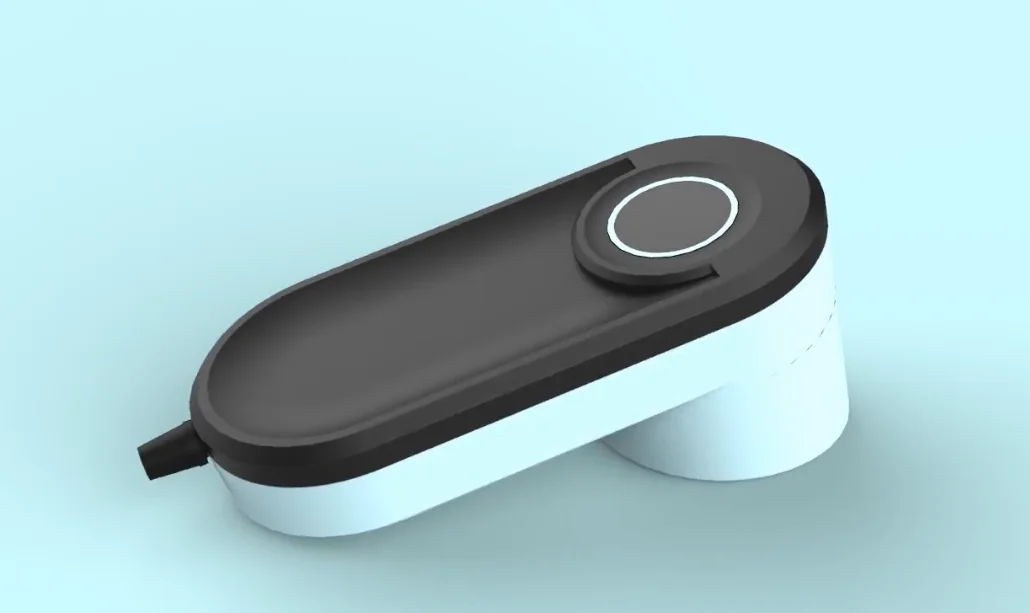
The seed is the asset. Stop storing it in software.
Authenticator apps hold your TOTP seeds as recoverable data. BioKey already protects FIDO credentials in tamper-resistant silicon — the same vault, the same fingerprint gate, can issue your one-time codes.
- Seed lives in app storage or the OS keystore — software-accessible.
- Extractable via malware or a rooted device.
- Synced to cloud backups — the seed leaves your control.
- Codes appear with no dedicated user-verification step once the phone is unlocked.
- Seed sealed in the secure element — no read-back API.
- HMAC computed inside the chip; only the 6 digits leave.
- Seed is never synced and never exported.
- Every code gated by an on-device fingerprint match.
FIDO2 + TOTP on one key.
BioKey already ships the primitives strong authentication needs. On-device TOTP is additive — an OATH applet that reuses what is already there. FIDO2 stays exactly as it is.
Secure element
The key store that holds FIDO credentials now also holds OATH seeds.
Biometric matcher
The same on-chip fingerprint user-verification gates every code release.
USB transport stack
CCID is added as a sibling interface beside the existing CTAPHID path.
On-chip crypto
The crypto engine already in BioKey computes the HMAC-SHA1/SHA-256.
One fingerprint-gated key for phishing-resistant FIDO2 and hardware-sealed TOTP — replacing both your security key and your phone authenticator. See how user verification flows through WebAuthn and FIDO2.
One device, two USB interfaces, one secure element.
TOTP rides into BioKey as an additive OATH applet — not new silicon. The key presents as a composite USB device: the existing FIDO HID interface is untouched, and a CCID (smart-card) interface is added for credential management.
Desktop / mobile
Companion app to list, add and calculate codes. A browser or OS field receives the code. The FIDO relying party is unchanged.
Three interfaces
CTAPHID for FIDO2 (unchanged) · CCID / PC/SC for TOTP management and calculate · optional keyboard HID for auto-type in the RTC variant.
MCU · biometrics · SE
The MCU routes interfaces and holds no key material. The biometric subsystem matches on-chip. The secure element stores seeds and computes the code.
Inside the secure element: seed in, code out. The OATH seed and FIDO credentials share the tamper-resistant key store. The crypto engine runs the HMAC and truncates to six digits. There is no export path and no read-back — only the code crosses the hardware boundary.
Provision once. Generate per touch.
BioKey supports both OATH modes from the same applet: TOTP (RFC 6238, where the counter is the current time) and HOTP (RFC 4226, where the counter is an on-chip event counter). Both are HMAC (RFC 2104) over the stored seed, truncated to a 6-digit code. The seed is the one thing that never moves.
Request
Companion app sends the current Unix time and credential ID to the device over CCID.
Verify
The device prompts for fingerprint. The match runs on-chip — no template leaves.
Compute
The secure element picks the counter — the time-step for TOTP, or the stored event counter for HOTP — runs HMAC over the seed, and truncates to six digits.
Return
Only the 6-digit code crosses the boundary. The app displays it, or it is typed via the optional HID path.
TOTP vs HOTP — when each wins
Same applet, same seed, same biometric gate — the only difference is what drives the counter. That one difference decides whether the device needs a clock.
| TOTP · RFC 6238 | HOTP · RFC 4226 | |
|---|---|---|
| Counter is | Current time (⌊unix/30⌋) | A monotonic event counter |
| Needs a clock | yes — time source required | no — counter lives in the SE |
| Code lifetime | Expires every 30s | Valid until used / next press |
| Failure mode | Clock skew (server window) | Counter drift if codes go unused (server look-ahead + resync) |
| Appless auto-type | Needs on-device RTC | Works with zero added hardware |
| Common use | Most consumer 2FA today | Banking tokens, OATH hardware, legacy fleets |
The HOTP payoff: because HOTP needs no clock — just a counter inside the secure element — it can deliver the appless “touch and it types the code” experience without any RTC or battery, removing the main hardware cost from the appless story.
Honest framing: both TOTP and HOTP are shared-secret schemes and remain phishable — a user can still type a code into a fake site. BioKey's value is hardening where the secret lives and forcing a biometric per code. OTP is the secure bridge for legacy services; FIDO2 stays the phishing-resistant gold standard — both on one key.
Where does the device get the time?
USB keys usually have no clock. That single fact drives the product. The host can supply the time (needs a companion app, zero battery) or a battery-backed real-time clock can keep it on the device (no app, but a coin cell to maintain).
Host-supplied time
Recommended V1via CCID companion app
- Clock: none on device — host sends time (already server-synced).
- BOM: lowest — no battery, no RTC.
- UX: app lists all accounts; manage/rename/delete; biometric per code.
- Fits: managed enterprise and multi-account power users.
- Cost: requires a companion app to function.
On-device RTC
Optional variantenables keyboard auto-type, no software
- Clock: battery-backed RTC keeps time on the chip.
- BOM: higher — coin cell + RTC; battery is a lifecycle item.
- UX: focus a field, touch + fingerprint — the device types the code.
- Fits: kiosks, locked-down hosts, single-credential buyers.
- Cost: clock drift and battery replacement; awkward for many accounts.
Recommendation: ship V1 with host-supplied time via a CCID companion app. Treat RTC + keyboard auto-type as an optional product variant.
HOTP changes this fork: the RTC variant only matters for appless time-based codes. If you want appless touch-to-type, ship it as HOTP instead — the counter lives in the secure element, so it needs no clock and no battery. The RTC then becomes a true nice-to-have, not a requirement.
CCID vs keyboard HID — and why you ship both.
The two USB interfaces serve different needs. CCID is the management workhorse; keyboard-HID is the appless convenience layer; CTAPHID stays exactly as it is for FIDO2.
| Capability | Keyboard HID | CCID (PC/SC) |
|---|---|---|
| Host software required | None — universal | Companion app |
| Communication | One-way — types the code | Bidirectional APDU — full dialog |
| Manage many credentials | awkward (one touch = one code) | list / add / delete / rename |
| Needs on-device clock | yes (RTC) | no — host supplies time |
| Best for | Appless auto-type, kiosks | Multi-account, enterprise |
| Status | Optional (RTC variant) | Core of V1 |
CTAPHID (FIDO2) already occupies its own HID usage page and is unaffected. Adding a CCID interface and an optional keyboard-HID interface makes BioKey a composite USB device — a firmware/descriptor change, not a hardware redesign.
How a seed gets onto the device — once.
Service QR
The web service shows an otpauth:// QR with secret, issuer, algorithm, digits and period.
App parses
The companion app scans or imports it and extracts the parameters.
Push to SE
The app sends an ADD-credential APDU; the secure element stores the seed in a protected slot.
Zeroize
Host memory holding the secret is wiped. From now on the seed exists only in the SE.
Be transparent about this: during enrollment the seed is transiently visible to the host, because the issuing service provides it as a QR/string. This is standard for TOTP enrollment. After enrollment, BioKey should expose no read-back/export path, and host memory is zeroized. A sealed SE-to-SE provisioning channel is a roadmap item.
Where it works — and the one constraint to flag.
| Platform | CCID (app) | Keyboard HID | Notes |
|---|---|---|---|
| Windows | yes — native PC/SC | yes | Cleanest target |
| macOS | yes — CryptoTokenKit | yes | Cleanest target |
| Linux | yes — pcsc-lite | yes | Cleanest target |
| Android | yes — USB host + lib | yes — USB-C / OTG | Strong mobile story; add NFC if hardware allows |
| iOS / iPadOS | restricted | restricted | Third-party USB HID/CCID access is limited even on USB-C iPhones. NFC is the practical path — only if the device has an NFC antenna. |
Decision to surface: iOS is the hard constraint. If iOS coverage matters to target buyers, the cleanest answer is an NFC antenna on the device (which also future-proofs FIDO-over-NFC). Otherwise scope V1 to desktop + Android and treat iOS as a fast-follow.
A build path that ships value early.
OATH applet + CCID + desktop app
Add the OATH applet to the secure element and a CCID interface. Ship a Windows / macOS / Linux companion app with enrollment, listing, and fingerprint-gated calculate. Reuses the entire FIDO platform — lowest-risk, fastest demo.
Android companion app
USB-C / OTG support with the same fingerprint-gated flow. Brings the “replace your phone authenticator” message to mobile.
RTC variant + keyboard auto-type
Optional hardware variant with a battery-backed clock. Touch-and-type codes with zero software for kiosk and locked-down buyers.
iOS via NFC + enterprise
NFC path for iOS, plus bulk provisioning, MDM hooks, admin policy, and sealed SE-to-SE enrollment for managed fleets.
What this does — and does not — claim.
What it does
- ✓ Keeps the TOTP seed inside secure hardware after enrollment.
- ✓ Exposes no seed export / read-back path from BioKey.
- ✓ Requires a fingerprint per code release.
- ✓ Reduces exposure from phone compromise or cloud authenticator backups.
- ✓ Supports services that do not yet support FIDO2.
What it does not
- ✗ Make TOTP phishing-resistant.
- ✗ Prevent users from typing OTPs into fake websites.
- ✗ Remove the need for FIDO2/WebAuthn where available.
- ✗ Eliminate transient seed exposure during enrollment.
- ✗ Guarantee iOS USB support without an NFC/hardware decision.
BioKey on-device TOTP, answered.
What is BioKey On-Device TOTP?
It is a proposed extension to AmbiSecure BioKey that adds OATH-TOTP one-time passwords. Seeds are stored inside the BioKey secure element, the HMAC is computed on-chip, and only the short-lived 6-digit code leaves the device after an on-device fingerprint match. It is additive to BioKey's existing FIDO2/CTAP2 capability rather than a replacement for it.
Is this more secure than a phone authenticator app?
It changes where the secret lives. A phone authenticator stores TOTP seeds in software-accessible storage or OS keystores that can be exposed by malware, a rooted device, or insecure cloud backups. BioKey keeps the seed inside tamper-resistant silicon with no read-back or export path, and requires a fingerprint before every code. It does not make TOTP itself phishing-resistant.
Does this replace FIDO2?
No. FIDO2/WebAuthn remains the primary, phishing-resistant authentication path and is unchanged. On-device TOTP is positioned as a secure bridge for legacy services that still depend on OTP codes and do not yet support FIDO2.
Is TOTP phishing-resistant?
No. TOTP is a shared-secret scheme and remains phishable: a user can still be tricked into typing a valid code into a fraudulent site. BioKey's contribution is hardening where the seed is stored and forcing a biometric per code — not making TOTP phishing-resistant. For phishing resistance, use FIDO2/WebAuthn.
What is the difference between TOTP and HOTP on BioKey?
Both are OATH one-time-password schemes computed from the same seed inside the secure element. TOTP (RFC 6238) uses the current time as its counter, so it needs a time source — supplied by the companion app in the recommended V1 — and codes expire every 30 seconds. HOTP (RFC 4226) uses a monotonic event counter stored on-chip, so it needs no clock at all. That makes HOTP the better fit for appless touch-to-type, because it works with zero added hardware.
Where is the TOTP seed stored?
Inside the BioKey secure element, in a protected slot alongside FIDO credentials. After enrollment there is no API to read back or export the seed; the secure element only accepts a request and returns a computed code.
Does every OTP require fingerprint verification?
Yes. Every code release is gated by an on-device fingerprint match. The biometric template is matched on-chip and never leaves the device, reusing the same user-verification subsystem BioKey already uses for FIDO2.
Does it work on Windows, macOS, Linux, Android, and iOS?
Windows, macOS, and Linux are clean targets via standard PC/SC (CCID) with a companion app. Android is supported over USB-C/OTG with a companion app. iOS/iPadOS is constrained because third-party USB HID/CCID access is limited; NFC is the practical path for iOS, but only if the BioKey hardware includes an NFC antenna.
Why is iOS support different?
iOS restricts third-party access to USB HID/CCID interfaces even on USB-C iPhones, so the companion-app-over-USB model used on desktop and Android does not translate directly. The practical route to iOS is NFC, which depends on an NFC antenna being present on the device — a hardware roadmap decision.
What is the recommended V1 implementation?
Host-supplied time over a CCID companion app. The host (already time-synced) supplies the current time, so BioKey needs no on-device clock or battery. This keeps the bill of materials lowest and supports listing, adding, renaming, and deleting credentials, with a fingerprint required per code.
Can BioKey type the OTP automatically?
Only in an optional hardware variant. Appless keyboard-HID auto-type requires the device to know the time on its own, which means a battery-backed real-time clock. That variant suits kiosks and locked-down hosts but adds battery lifecycle and clock-drift considerations, so it is treated as an optional product variant rather than the V1 default.
Where this fits in the bigger picture.
Product: BioKey
The biometric USB security key this extension builds on.
Technology: FIDO2
The phishing-resistant primary path that stays unchanged.
Technology: Secure elements
The tamper-resistant vault that seals the OATH seed.
Solution: Passwordless MFA
How phishing-resistant login and legacy MFA sit together.
Product: OnePass USB Key
The non-biometric tier of the USB security key range.
All products
The full AmbiSecure hardware and applet catalogue.
Evaluating one key for FIDO2 and legacy MFA?
Tell us your host platforms, whether iOS coverage matters, and your account volume. We can map the time-source and NFC decisions to your rollout.